 IntuneBrew
Carry over assignments
Move group assignments from the previous version of an app to the updated one, so users keep receiving it.
When IntuneBrew updates an app, it uploads the new version as a new app in Intune, next to the previous one. A new app has no assignments, so without carry-over nobody receives the update until you assign it. Carry-over moves the assignments of the previous version to the new one as part of the update.
Turn it on
Go to Settings → App Updates and switch on Preserve assignments when updating apps. It is off by default.
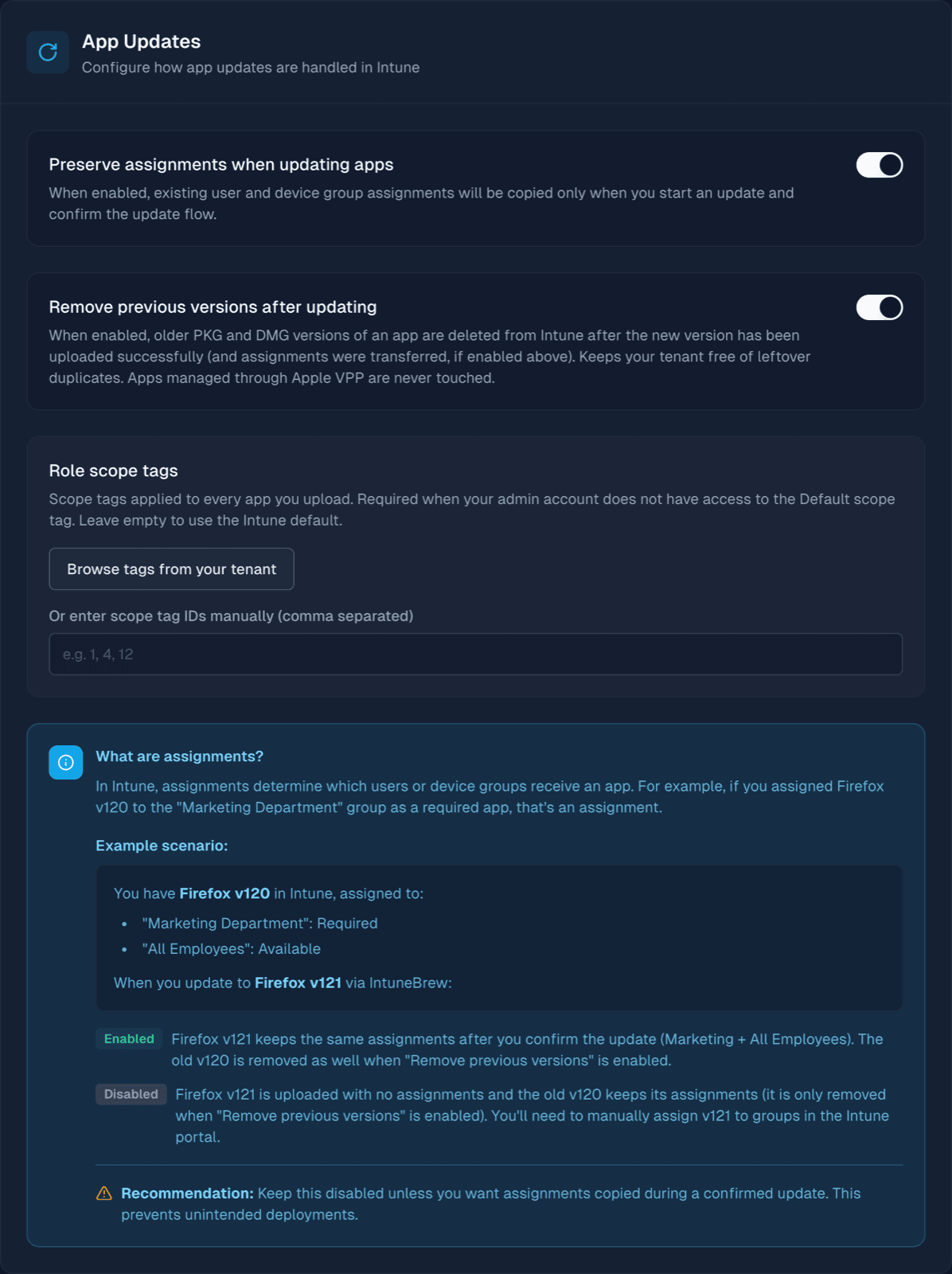
The setting belongs to your own account, not to the whole team. Each person who publishes updates chooses it for themselves.
You can also decide per update:
- Update uses your setting.
- Update now (keep assignments) in the Update button's menu always carries assignments over.
- When you update several apps at once, the Keep assignments checkbox starts from your setting and can be changed for that batch.
- Publish to ring… never carries assignments over. See Update rings.
Check before you publish
Before anything changes, the Review Tenant Change dialog shows whether assignments will be carried over and lists the groups that will receive the new version. Nothing happens in Intune until you confirm.
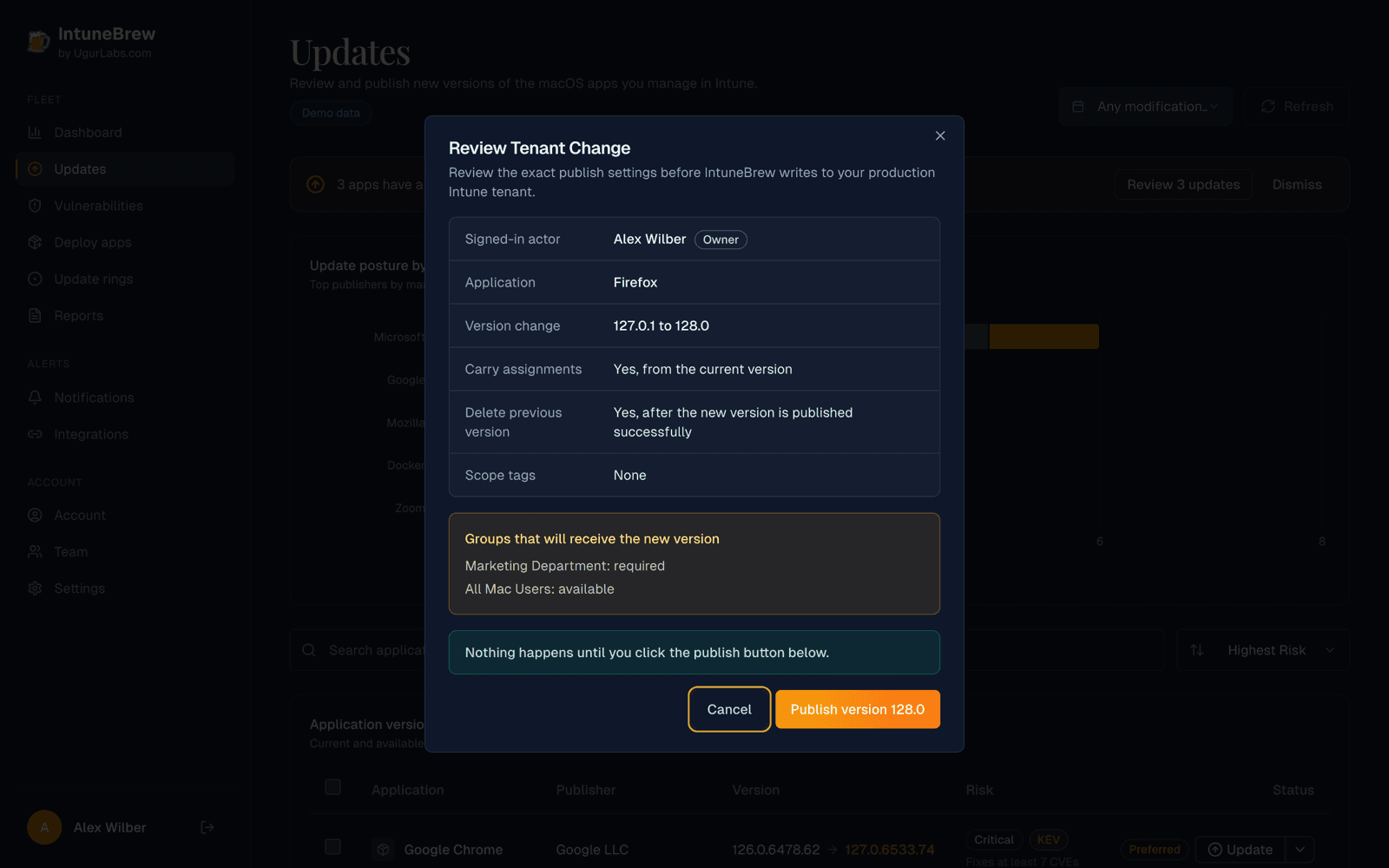
If someone changes the previous version's assignments in Intune after you opened the review, IntuneBrew notices the difference and leaves all assignments as they are.
What gets moved
For every assignment of the previous version, IntuneBrew creates the same assignment on the new version and only then removes it from the previous version. If creating it fails, the original assignment stays where it is.
| Kept exactly | Notes |
|---|---|
| Assignment type | Required, Available, and Uninstall |
| Target groups | Including excluded groups |
| Assignment filters | Include and exclude filters |
| Uninstall on device removal | The macOS assignment setting |
Assignments with other settings stay on the previous version, and the update finishes with a Previous versions preserved notice so you can move them yourself.
Which version assignments come from
IntuneBrew takes assignments from a previous version only when it is sure it is the same app:
- It has the same display name and is a PKG or DMG app. Apps managed through Apple VPP or other app types are never touched.
- Its bundle ID matches the catalog app.
- If you updated from the dashboard, it is the version shown in the review. If that copy has no assignments but exactly one other copy of the app does, assignments come from that copy.
If two or more copies have assignments, or a copy can't be verified, IntuneBrew doesn't guess. It uploads the new version and leaves every assignment unchanged.
When it happens
Assignments are moved only after Intune confirms the new version is fully uploaded and published. If the upload fails at any point, the previous version and its assignments are untouched.
Removing previous versions
Remove previous versions after updating, in the same settings section, deletes older PKG and DMG copies of the app once the update succeeds:
- With carry-over on, a previous version is deleted only if it has no assignments left after the move. Copies that still have assignments, or that can't be checked, are kept.
- With carry-over off, every older PKG and DMG copy with the same name is deleted, including copies that are still assigned. Devices then stop receiving the app through those assignments.
Use both settings together
If you remove previous versions, keep Preserve assignments when updating apps switched on as well. Otherwise an update can delete the copy your groups are assigned to.
Notices after an update
When the new version uploads fine but assignments couldn't be handled completely, the update still counts as successful and shows an amber notice:
| Notice | What it means | What to do |
|---|---|---|
| Assignment verification needed | The previous version couldn't be verified, or no previous version had assignments. Nothing was moved. | Assign the new version in Intune, or move the assignments yourself. |
| Previous versions preserved | Some assignments or previous versions were kept on purpose. | Check both versions in Intune before removing the old one. |
| Ring assignment incomplete | Not every ring group could be assigned. | Assign the listed groups to the new version in Intune. |
If you turned on publish alerts in Notifications, you also get a Publish incomplete email.
With the PowerShell tool
Use -PreserveAssignments (or -CopyAssignments) with the PowerShell tool. It moves the assignments of the previous version the same way and keeps the previous app.